One of the easiest times to overspend on a personal website is before you buy a server.
You want to write, so you research content management systems. You want a newsletter, so you compare membership tools. You might sell something later, so payments and marketing automation join the list. Before the first article is published, the website has acquired the infrastructure of a small company.
I did much the same when building Hammersmith.
My original plan was to rent two VPS instances: one for n8n and a database, and another for Ghost. After reconsidering what I actually needed, I chose Astro for the bilingual website, GitHub for version control, Cloudflare Pages for hosting, and Kit for a free newsletter.
This guide explains that choice and the work involved in organizing content, deploying the site, and connecting email and search tools. It is for individual creators who want a home for articles, principles, tools, and projects, without making paid subscriptions the center of the business from day one.
The launch results below describe the checks completed on October 22, 2026. Prices were checked on October 23. Bilingual pages, subscription confirmation, and unsubscribing have been tested. Long-term traffic, audience growth, and revenue remain to be seen.
1. Define the website’s job before comparing platforms
Three requirements changed my choice
I already owned lens78.cn and had articles and principles to publish. The question was how to organize them into a public site I could keep updating.
| Requirement | What the site needed |
|---|---|
| Chinese and English from the start | Stable language URLs, paired articles, and reliable language switching |
| Articles, principles, tools, and projects | Different structures for different kinds of content |
| A free newsletter, with no paid membership business yet | No immediate need to build around payments, access tiers, or sales funnels |
The third requirement was decisive. I had been comparing the cost of paid subscriptions, automated email sequences, and sales funnels without a specific product or service for them to support.
The first version now had a clearer purpose:
Let people read my work, explore real projects, and choose to receive future updates.
What the comparison actually means
Ghost is a publishing system that brings editing, web publishing, memberships, and newsletters together. Astro is a website framework: you build the site’s structure and publishing process, then connect external services for capabilities such as email. Ghost’s official overview
| Dimension | Ghost | The Astro setup used here |
|---|---|---|
| Everyday writing | Centered on an editor and publishing dashboard | Centered on Markdown files and Git |
| Newsletter | Part of the publishing workflow; email delivery still needs configuration | Handled by Kit, separately from website publishing |
| Memberships and payments | Product capabilities already exist; hosted plans differ | Not implemented here; can be added when needed |
| Bilingual structure | Requires decisions about themes, content, and routing | Explicit /zh/ and /en/ routes with paired content |
| Project pages and custom layouts | Implemented through themes and customization | Developed directly as needed |
| Maintenance | Self-hosting requires service maintenance; managed hosting takes on part of that work | Content, dependencies, builds, and service connections |
My deciding question was how I wanted to maintain the site over time.
If you want to spend most of your time in a publishing dashboard, writing, sending newsletters, and managing memberships, Ghost deserves serious consideration.
If you want an article library, a collection of methods, and a project portfolio—and are comfortable maintaining pages with Git—Astro is appealing.
Choosing Astro meant accepting file-based editing, build checks, and configuration across several services.
2. Architecture and starting costs
Content publishing and newsletter subscriptions follow separate paths. Notion holds the master manuscript. The website edition is adapted and checked before publication, while readers subscribe through Kit.
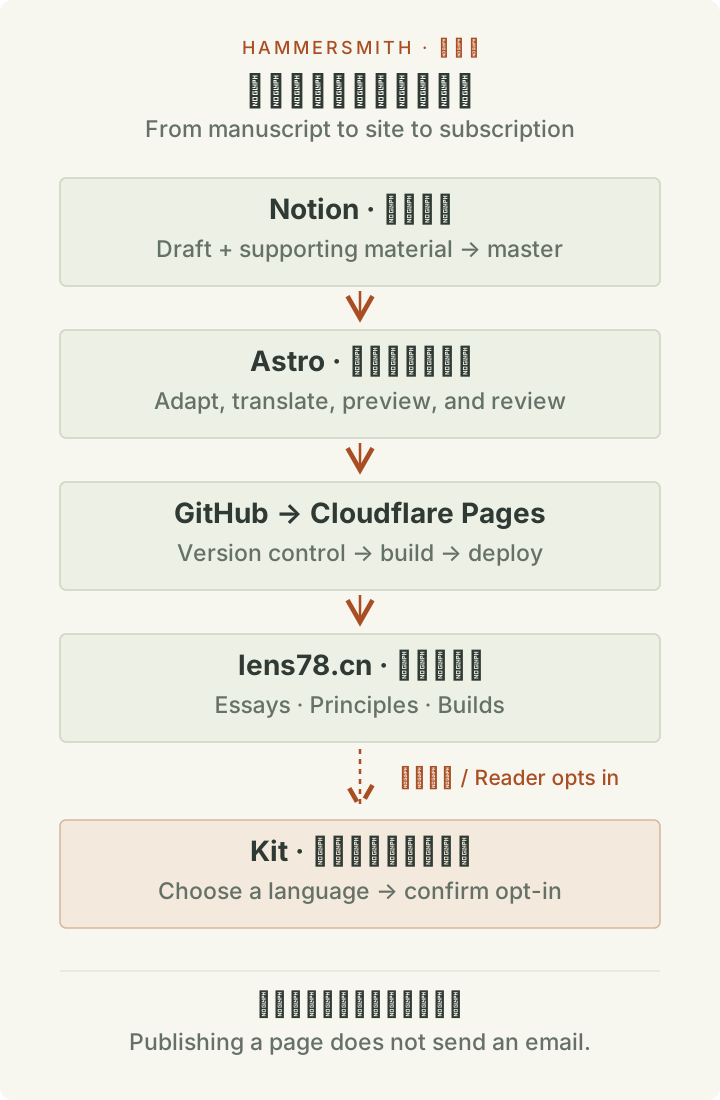
| Component | Its role on this site |
|---|---|
| Astro | Content pages, section pages, and bilingual navigation |
| GitHub | Website source files and revision history |
| Cloudflare Pages | Building and hosting the site from its repository |
| Cloudflare DNS | Website, email, and service-verification records |
| Cloudflare Email Routing | Forwarding messages sent to [email protected] to an existing inbox |
| Kit | Subscriptions, confirmations, unsubscribes, and newsletter delivery |
| Google Search Console and Bing Webmaster Tools | Crawl, indexing, and search reporting |
The website therefore needs no additional VPS, and its operation does not depend on my existing n8n instance or database.
There are still connections to configure: domain to hosting, forms to Kit, and a verified sender address. Most of the launch difficulties occurred at those boundaries.
How the costs compare with Ghost
The table compares website and newsletter service charges. All options would use my existing domain, so renewal costs are excluded from the difference. AI tools and labor are also outside this service-cost comparison.
| Option | Starting service cost | Billing basis and main differences |
|---|---|---|
| This Astro + Cloudflare Pages + Kit Free setup | $0 per month | Currently on free plans; Pages has build and other limits, and Kit advertises up to 10,000 subscribers on Free |
| Ghost(Pro) Starter | $18 per month billed yearly, or $216 per year | The 1,000-member tier; hosting, website, newsletter, and basic design settings |
| Ghost(Pro) Publisher | $29 per month billed yearly, or $348 per year | The 1,000-member tier; adds custom themes, paid subscriptions, and other capabilities |
| Self-hosted Ghost | Free software, plus VPS, email service, and any backup costs | Depends on provider, configuration, and sending volume; server maintenance is your responsibility |
Sources: Ghost(Pro) pricing, Kit pricing, and Cloudflare Pages limits. Ghost figures are monthly equivalents for annual billing. Member counts, billing cycles, and taxes affect the actual bill; free services are subject to their plan conditions.
At this stage, I did not need paid memberships or a unified publishing dashboard. The free services let me defer the $216–348 annual base-plan expense of Ghost(Pro) and decide later whether those capabilities justified paying for them.
If a unified dashboard saves you substantial editing and maintenance time, that fee may be worthwhile. Self-hosted Ghost needs its own cost calculation: the price of the software alone cannot be compared with an entire managed service.
3. Plan content around real material
Navigation should tell readers what they will find
Hammersmith can have a distinctive identity while keeping navigation straightforward. I retained familiar labels such as Essays, Principles, Builds, and Newsletter, and explained Lifesmithing in the introduction to my approach.
| Section | The reader’s question | Suitable content |
|---|---|---|
| Start here | Is this site relevant to me? | Direction, reading paths, and representative work |
| Essays | How should I understand this problem? | Arguments, methods, and reflections |
| Principles | How can I make a judgment in a similar situation? | Principles, conditions, examples, and limits |
| Builds | How was this actually made? | Tools, workflows, projects, and test results |
| Newsletter | How can I keep receiving useful updates? | What to expect and language-specific subscription forms |
| About | Who is writing, and what are they working on? | Background, current direction, and contact details |
A small launch collection can be enough
I started with two essays, two principles, and one FreshRSS case study, each with an English edition.
The essays introduced my way of thinking. The principles developed personal observations into judgments readers could discuss and apply. FreshRSS documented a real build and included instructions for installing it locally with Docker.
I did not yet have a finished commercial MVP. An existing workflow was enough for a case study, provided I explained the problem, the implementation, and what had actually been verified.
A useful project page should cover the problem, intended users, implementation, important trade-offs, verified results, and current limitations. Those details help readers assess relevance more than a polished screenshot alone. The FreshRSS reading workflow follows that approach.
Pair bilingual content explicitly
Chinese and English editions live in separate files and share a contentId:
src/content/
├── essays/
│   ├── eight-atoms.zh.md
│   └── eight-atoms.en.md
├── principles/
│   ├── connected-points.zh.md
│   └── connected-points.en.md
└── projects/
    ├── freshrss-reading.zh.md
    └── freshrss-reading.en.md
Each file begins with metadata. For example:
---
contentId: connected-points
lang: en
section: principles
title: "Work Where Important Things Connect"
description: "Find actions that can improve several connected parts of a system."
draft: false
reviewed: true
---
The draft and reviewed fields are custom publishing controls on this site. Only entries that pass the site’s filter appear in pages, RSS feeds, and the sitemap.
After pairing the files, test the language switch on the actual article. It should lead to that article’s translation. If a translation is unavailable, say so clearly.
Review translations for facts, numbers, instructions, and project status. A different language must not imply a different result.
4. Design the identity, then test the reading experience
The final name is Hammersmith · 打铁客, with the English tagline:
Forging myself with code and words. Every day.
Getting there involved both a name change and a change of palette. I initially chose a dark background to evoke iron and fire. Once I saw the pages, it felt too dark. I returned to warm off-white, dark text, and restrained copper-orange accents.
A strong visual identity still needs a separate reading check. Long articles, code blocks, phone screens, and subscription forms may not suit the palette that looked striking in a homepage mockup.
5. Separate local development, previews, and production
Check the local version first
Before connecting cloud services, I checked both language editions, same-article language switching, mobile reading and navigation, code blocks and copying, images, internal links, branding, RSS, the sitemap, and error pages.
The build also runs automated checks. This project’s build:check script performs Astro diagnostics, a static build, and the existing tests.
One actual obstacle was the system’s Node version: it did not meet the project’s requirements. We used a compatible runtime already available on the machine instead of replacing the global environment for one website.
For a new project, use the Node version required by your Astro release and keep local and cloud build environments consistent.
Connect GitHub and Cloudflare Pages
The website source lives in a private GitHub repository connected to Cloudflare Pages.
| Setting | This project’s configuration |
|---|---|
| Production branch | main |
| Root directory | Repository root |
| Build command | npm run build:check |
| Output directory | dist |
| Production | Search indexing allowed |
| Branch previews | Kept out of the index |
build:check is a script defined in this repository. Another project should use its own actual build command. Cloudflare’s Astro deployment guide explains the configuration points.
After pushing code, inspect the cloud build result. A successful Git push confirms that the code arrived; it does not confirm a successful deployment.
Move to the main domain last
Because the domain had been used before, we backed up its DNS records first, changed the website records, and preserved those needed for email and other services.
The launch steps were:
- Add lens78.cn as a custom domain in Pages.
- Configure website DNS according to the dashboard.
- Verify HTTPS on the actual domain.
- Redirect www and the production pages.dev hostname to the main domain.
- Keep branch previews available.
- Check old article redirects and genuine 404 responses for unknown URLs.
6. Email needs confirmation and unsubscribe testing
Distinguish incoming mail from outgoing newsletters
| Direction | Delivery path |
|---|---|
| Someone writes to [email protected] | Cloudflare Email Routing forwards it to my existing inbox |
| I send a newsletter to subscribers | Kit delivers it to subscribers |
Email Routing handles or forwards incoming messages. Setting it up does not automatically create a complete mailbox that can send as hello from Gmail. One-to-one outbound mail needs a separate setup. Cloudflare’s documentation
Give each language its own subscription form
I created separate Chinese and English forms in Kit, embedded them in the corresponding newsletter pages, and enabled confirmation emails.
Recipients can then be selected by the form they subscribed through, rather than by guesses based on their name, country, or email address. Someone who chooses both editions can receive both. Someone who chooses Chinese should not receive English merely because the sender left “All Subscribers” selected.
Account approval was the real blocker
During the first test, subscription records appeared in Kit, but the confirmation emails never arrived.
The account still had restricted features and required an approval conversation. We spoke with Kit support, explained the site’s purpose and how subscribers would opt in, and supplied updated information after the name changed.
Once approval was complete, we submitted fresh Chinese and English test subscriptions through the live site. Both confirmation emails arrived.
The experience left a useful troubleshooting sequence:
| Symptom | Check first |
|---|---|
| No subscriber record after submission | Form connection and submission result |
| A record exists, but no confirmation email | Account restrictions, confirmation settings, sender address, and domain status |
| Email arrived, but the subscriber remains unconfirmed | Whether the confirmation link was clicked and the status updated |
| The wrong language was delivered | Form membership and recipient filtering |
| An unsubscribed reader is still selected as an active recipient | Subscription status and filter logic |
Include unsubscribing in the acceptance test
We completed the full sequence: subscribe → receive the confirmation email → confirm → unsubscribe and check the status.
The Chinese test subscription was retained and the English one cancelled. The dashboard matched those actions before the flow was marked complete.
Seeing the two emails arrive under the Hammersmith name was the moment I relaxed. I had already seen plenty of pages and settings; now I had seen the journey a reader would actually take.
7. Make the site accessible and understandable to search engines
I considered both SEO and visibility in AI search during selection. For the first version, the work stayed focused on the basics.
| Item | Purpose of the check |
|---|---|
| Page titles and descriptions | Explain each page’s subject |
| Canonical links | Identify the preferred URL |
| hreflang | Express the relationship between language editions |
| Sitemap | List discoverable URLs |
| Robots and indexing settings | Ensure production does not retain preview restrictions |
| Structured data | Describe the page consistently with its visible content |
| Internal links, 301s, and 404s | Keep navigation and URL behavior sound |
Both Google Search Console and Bing Webmaster Tools were verified through DNS.
At the initial launch check, Google had processed the sitemap and reported 27 discovered pages. Bing had accepted its sitemap and was still processing it. Those are historical acceptance results, not a claim that every page was indexed.
There is also no reason to promise that a framework automatically ranks better in AI search. Google states that established SEO practices remain relevant to its AI search features, with no additional special optimization required. Google’s guidance
My approach to the content is to explain specific problems, provide real steps and evidence, and state where conclusions apply. Search and citation data can guide later changes.
8. Ongoing maintenance determines whether the setup saves effort
The current website workflow is prepare material → update Chinese and English files → preview locally or on a branch → approve → push to production → verify the live pages.
I draft in Notion, then add the supporting material to develop a master manuscript. Whether I publish a long-form article on X or on my own site, I adapt that master to the destination’s format and requirements.
There is currently no automatic Notion-to-website synchronization. When the master changes, the relevant revisions must be applied to the website edition and checked in English as well.
The first version also has room to improve. Lists currently sort by content identifier, and the homepage’s featured project is still fixed to FreshRSS. As the collection grows, the section layouts and validation rules need to be reviewed.
Kit controls email sending and web publishing separately. Publishing a page in Kit does not update the Astro site. Kit’s Broadcast guide
9. The choices I would make again
If I started over, I would still begin by writing down the website’s current job.
Bilingual content, a growing set of principles, project pages, and a free newsletter were enough for the first version. Paid memberships, sales funnels, and complex automation can wait for a specific product or service.
I would also prepare real content earlier. Once actual long articles, code, and project explanations are in the layout, it becomes much easier to judge the navigation, typography, and colors.
At the initial launch check, the site was readable, subscriptions worked, and search services were connected. No editorial newsletter had been sent yet, and the long-term results still depended on the work to come.
The satisfaction was concrete: a domain I had largely abandoned now held my essays, principles, and projects. The next time I build a tool or revise a judgment, I know where it can go.
The homepage says:
Forging myself with code and words. Every day.
The site is live. Now I can keep adding work worth keeping.