Subscriptions help articles reach me, but reading still involves checking what text is available, translating it, moving it to a convenient place, and managing its status.
This project combines FreshRSS and n8n to deliver subscribed text into a Chinese reading workflow in Feishu. FreshRSS is an existing open-source reader. My contribution is the integration and the adjustments made around a personal reading need.
Install FreshRSS locally with Docker
This Windows example creates a separate reader with Docker Desktop. Translation and Feishu delivery require the later n8n integration. The example has its own project, volumes, and port 18080; it does not reuse the existing case-study instance.
1 Start Docker Desktop
Follow the official Windows installation guide, using the WSL 2 backend and Linux containers. Start Docker Desktop, complete any requested restart, then check in PowerShell:
docker version
docker compose version
The first command should include Server information. If it only shows the client or cannot connect, check that Docker Desktop is running.
2 Create a separate configuration
mkdir freshrss-demo
cd freshrss-demo
notepad compose.yaml
Save this configuration as compose.yaml, not compose.yaml.txt:
name: lens78-freshrss-demo
services:
  freshrss:
    image: freshrss/freshrss:latest
    restart: unless-stopped
    ports:
      - "127.0.0.1:18080:80"
    environment:
      TZ: Asia/Shanghai
      CRON_MIN: "*/20"
    volumes:
      - freshrss_data:/var/www/FreshRSS/data
      - freshrss_extensions:/var/www/FreshRSS/extensions
volumes:
  freshrss_data:
  freshrss_extensions:
The official latest image tracks the latest versioned release; you can later pin a specific release. Named volumes persist data and extensions. The port is bound to this computer only. If 18080 is occupied, change the middle port number. See the FreshRSS Docker documentation.
3 Start and configure the reader
docker compose up -d
docker compose ps
docker compose logs --tail 50 freshrss
Open http://127.0.0.1:18080. Choose a language and SQLite in the setup wizard, then create your own administrator credentials. Keep passwords out of public files and screenshots. Add one RSS feed, refresh it, and check that an entry and its original link open.
This configuration refreshes feeds every twenty minutes while the computer and Docker remain running. Sleep or shutdown interrupts the schedule. A running container does not establish that every feed is reachable.
4 Stop without removing data
docker compose stop
docker compose start
These commands retain data. Avoid docker compose down -v for routine stopping: it deletes this project’s volumes. Keep a separate backup before upgrades; OPML preserves the subscription list, not the complete reader data.
5 Connect n8n separately
Enable FreshRSS API access and set a separate API password when needed. Inside an n8n container, localhost refers to n8n itself. On a shared Docker network, use the service address http://freshrss:80. host.docker.internal refers to the host; it is not a FreshRSS service name and does not establish that a loopback-only host port is reachable. Verify the actual network path before adding translation or delivery.
This section is installation guidance. No additional FreshRSS instance was deployed for this write-up.
How an article moves through it
The historically verified version was scheduled for 19:00 China Standard Time and selected up to five unread FreshRSS articles per day. It attempted to retrieve the text and identify its language. Chinese text was delivered directly; English text was translated in paragraph-based chunks before delivery.
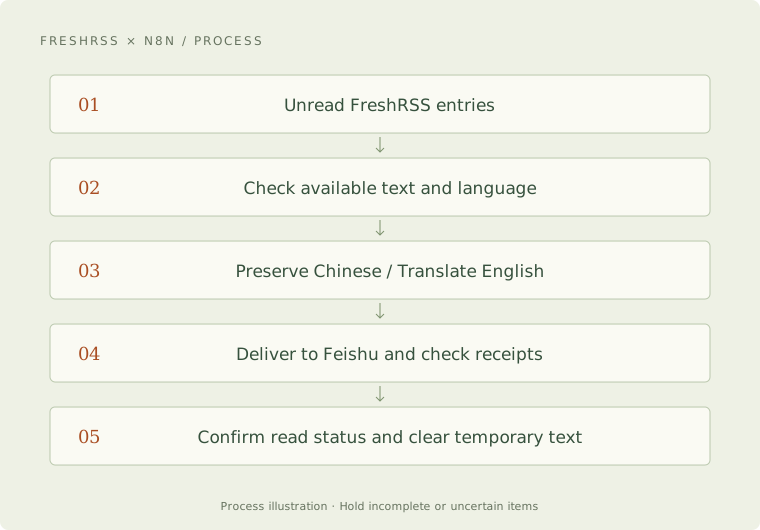
This is a process diagram, not an execution screenshot. In this workflow, a read marker records completed delivery and synchronization. It does not establish that I have actually read the article.
Items remain unresolved if only a summary is available, the public text cannot be retrieved, the language is uncertain, or processing exceeds the configured bounds. A podcast description remains a description; it is not represented as a transcript.
Three decisions that changed during construction
Moving from summaries to text delivery. After an initial summary version, the need was clarified: preserve Chinese text and translate English text. Successful delivery of a summary did not meet the revised need.
Splitting at complete words, sentences, and paragraphs. An English sample exposed a long-list splitting problem. The boundaries were corrected, existing correct translations were retained, and only the changed portion was processed again.
Saving progress between independent steps. A later version separated translation, sending, state synchronization, and cleanup. After an interruption, it checks existing receipts before repeating a paid call or a delivery. Temporary content is removed after delivery and read-state confirmation.
What actually happened
A naturally scheduled batch on September 26, 2026 processed four articles. Its record contains four successful Feishu delivery receipts, FreshRSS read-state confirmation receipts for the four articles, and eleven translation-group receipts. Temporary article content was cleared at the end. The user also confirmed receiving four articles.
That establishes completion of this particular delivery chain. The translations in that batch were not individually reviewed, and no reading-time baseline was recorded. It therefore does not establish hours saved or a lasting improvement in reading. This case describes a historical version; today’s operation has not been rechecked for this write-up.
Where the approach may be useful
If you already use RSS and want some English text delivered into a familiar Chinese reading environment, the approach may be worth adapting. Availability of source text, extraction quality, translation costs, and delivery limits need checking against your own sources and setup.
This page is a case study. There is currently no public live demo, general installation package, or hosted service offered here. Existing verification came from a local setup and does not establish that a VPS deployment has been completed.
What I want to observe next
Does receiving the text make me more likely to read it? Is a limit of five articles still too much? Are translation and maintenance worth their cost? Feedback on these questions will determine how much the workflow actually helps.